r/musichoarder • u/deluan • 1h ago
Last.fm scrobbling in Navidrome will require a Pro-backed API key starting December 1
•
Upvotes
r/musichoarder • u/doodarndang • Mar 18 '26
Hello everyone! Recently we’ve had a surge in posts about new software, tools, extensions, and apps for music collecting. When the subreddit is full of software posts, posts with questions and important topics are buried and missed. In addition, many of these tools were quickly made using AI. For many reasons, these “vibe coded” apps will not be tolerated on this subreddit anymore.
If you made a tool or project that you want to share: please message the moderators for approval before posting. Sending proof that the software was coded by you or another human is also recommended but not required.
Some of these vibe code project posts slip through the cracks. If you come across them, please help by reporting the post for violating Rule 4.
Thank you for your understanding,
The [r/musichoarder](r/musichoarder) mod team
r/musichoarder • u/deluan • 1h ago
r/musichoarder • u/friedspinach101 • 48m ago
r/musichoarder • u/Born2Die007 • 58m ago

Hey everyone! I'm the developer behind OfflineTunes, and I'm looking for a few people who would be interested in testing a new feature I've been working on for a while.
Ever since I started building OfflineTunes, I've had this idea of turning the phone itself into a music server. I built a custom RPC architecture over 4 years ago when i started working on this app with the intention of eventually allowing me to host my entire music library directly from my phone and access it from other devices.
The idea is that I can use my phone as my main source of audio files, and whenever I want to listen to my music on my PC, I can just connect to it through a browser. Eventually, I'd also like to aggregate all the different services and cloud storage providers where I have music stored so I can access everything in one place.
There are two different server modes:
Both modes support the visualizer. In Full Player Mode, you can trigger it directly from the desktop using your mouse, while in Playback Mode, you can trigger it from your phone.
How does it work?
The most basic use case is pretty straightforward. You start the music server on your phone, open the desktop client in your browser, and you have access to the music stored locally on your device.
But it goes beyond just streaming local files.
If you have music stored on cloud services like Dropbox, OneDrive, S3, WebDAV drives like Nextcloud, and other connected services, you can also access and stream those tracks directly through the browser. The phone basically acts as a proxy, streaming directly from those services rather than requiring you to download everything onto your phone first.
Note: For obvious DRM reasons, you can't stream music from your iPod/iTunes-synced tracks or Apple Music subscription. Those can only be listened to through the app itself.
This also works with Plex, Jellyfin, and Navidrome, although using the phone as a gateway for those services doesn't make quite as much sense since they're already hosted servers. It could still be useful if you want to quickly transfer tracks from those servers to your PC or want to host your local only self-hosted server so that it can be streamed remotely.
What can you do from the desktop?
It's not just a basic music player. The desktop client currently supports quite a few features:
FineTune Mode is actually one of the big reasons I wanted to build this feature.
I wanted to be able to finetune my music library while working on my desktop, without having to constantly switch back to my phone. FineTune Mode allows you to go through your music, filter out tracks you don't want, approve or reject songs, and organize everything into playlists or remove unwanted tracks from your library.
Having this available on the desktop means I can listen to music while working and clean up my library at the same time. It's something I personally wanted to use, and having it available through the server makes that workflow much more convenient.
Some of these features still need optimization, and the desktop experience currently uses the iPad view as its starting point. I'm gradually changing things to make it feel more like a proper desktop application rather than just an iPad interface running in a browser.
Note: EQ, gapless playback, bit-perfect audio, crossfade, Automix, and ReplayGain do not work in server mode and are unlikely to be supported in the future.
How do you connect?
There are currently two ways to connect your desktop to the phone.
I wouldn't recommend relying on the remote connection if you're on the same network, though, since it has additional costs and is slower than connecting directly through the local IP.
There is also an interesting part to the remote connection. Once connected through the website, you can grant permission to use the browser's Local Network API. This allows the desktop client to discover and use the phone's local IP address for streaming, which is much more performant.
The website also remembers your connected device. So the next time you start the server, you can simply select your phone from the device list and load the application.
The desktop client is a PWA, so you can install it as a desktop app and launch it directly. When everything works as expected, the entire process of opening the app, starting the server, and connecting to your desktop takes less than 20 seconds.
Why did I build this?
Personally, I want to use my phone as my main music source without having to maintain my own Plex, Navidrome, or Jellyfin server.
I've moved most of my music storage to Nextcloud, and I wanted a way to get the benefits of having a dedicated music server without actually having to host one.
One of the things I really wanted was to keep all my music activity in one place. Play counts, scrobbling, ratings, metadata editing, and everything else should work regardless of whether I'm listening from my phone or desktop.
For example, if I edit cover art or change a tag from the desktop client, the app can write those changes back to the original file in Nextcloud. This way, I'm not maintaining separate copies of my music or losing track of my listening history just because I'm using a different device.
Ultimately, I want to be able to pick up my phone, start the server, connect from my PC, and have access to my entire music library without needing another computer running in the background.
A few things about pricing and availability
Currently, this feature is available on iOS only, since that's where OfflineTunes is currently available. I'm slowly working on an Android port that will include the same features, but that takes time. Once that's ready, the music server should work on Android as well.
If you're using the free version of the app, you can watch an ad to unlock a 45-minute session on the Player Server.
If you're interested in testing it for longer or want to experience the feature without session limitations, just reach out to me. I'm happy to help extend your free testing access so you don't have to pay just to test this feature in its fullest.
One thing worth mentioning is that audio conversion and tag editing are not available on the server for free users. Unlike the mobile app, where these features are available through ads, implementing ads in a desktop browser environment opens up a whole other level of complexity that I don't want to get into while this feature is still experimental.
What needs work?
This is still very experimental, and there are quite a few things that need improvement.
I'm sharing this because I'd really appreciate having some people test it out and give me feedback. I'm particularly interested in hearing how it performs with different music libraries, cloud storage providers, and network configurations.
I'm not just looking for people to try the player, but also people who might have ideas about how this kind of setup could be improved.
If you're interested in testing it, let me know! I'd really appreciate any feedback, suggestions, or guidance that could help me improve this.
Thanks!
P.S. All the thoughts, ideas, and words in this post are my own. ChatGPT helped me organize and rewrite them, as well as fix spelling and grammar mistakes since English isn't my primary language. I wanted to make that clear!
DM me if you are interested!
r/musichoarder • u/chickenlogic • 14h ago
I have many live albums that don't have venue data or performance date in the Album Name: David Live, Reckoning, Smell of Female, etc. Sometimes I want this data available while listening.
Just use any tag editor progran and edit these two tags:
PUBLISHER: (must be filled in with something)
COPYRIGHT: (fill in what you want displayed here)
For example:
PUBLISHER: Grateful Dead Productions
COPYRIGHT: 1980-10-14 Warfield Theatre, San Francisco, CA
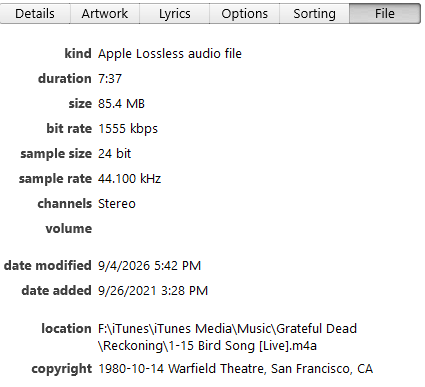
The second line now shows up in song info, on the Remote app, and on the Music app when played locally on a phone.
For other live albums, particularly audience recordings, the AlbumName is just the location an performance date. The method above works great for commercial releases,
r/musichoarder • u/TKB21 • 20h ago
Was considering using ID3's TIPL (Involved List) but obviously companies aren't "people" but the closest it had to offer outside of using a custom field. Would love to hear how you've creatively listed these. Thanks!
r/musichoarder • u/vagdesign • 19h ago

r/musichoarder • u/HippoOutrageous9081 • 22h ago
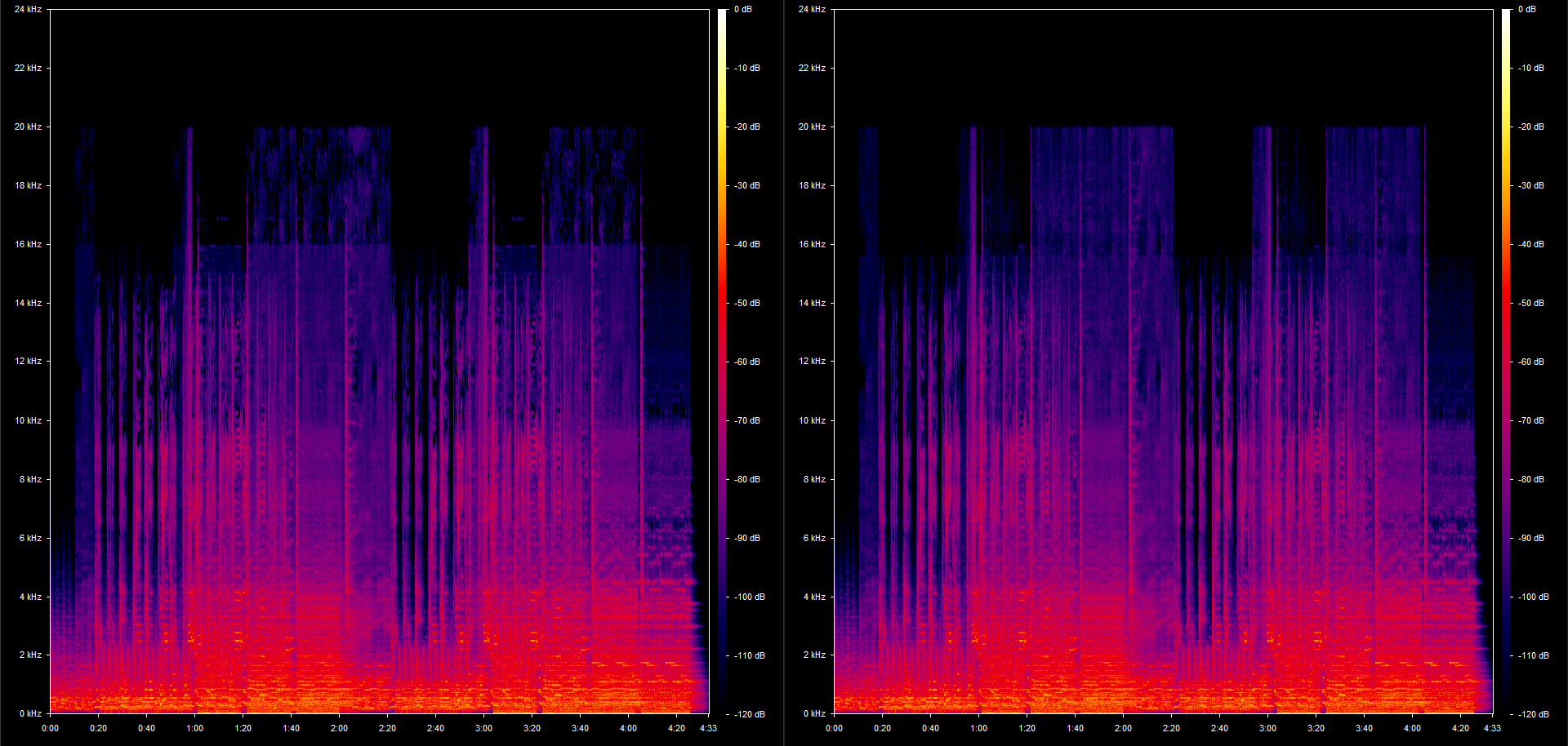
The left has a bit more going up to 16kHz but the right has a bit more from there on up.
r/musichoarder • u/QualitySound96 • 1d ago
Long time hoarder and for years I’ve manually added the featured artists in the song as my format is the song name (feat. Whoever)
I have about 40 albums and it’s all just the song name and I really am dreading manually typing and looking up each album and adding the features one by one. I’ve been doing this for a long time and type it in but at this point when I add large discogs it’s overwhelming to want to put time into manually doing this.
r/musichoarder • u/whatAshame63 • 1d ago
[ Removed by Reddit on account of violating the content policy. ]
r/musichoarder • u/astr0rdinary • 1d ago
can someone educate on a foolproof way to download/transfer my library/playlists one to one so that i can leave?? being autistic with a special interest in music has made it impossible for me to cross the platform barrier to yt or apple because its not exact. can i somehow go old school ish and burn everything onto a cd? what about my playlists thatre 60 hours plus?
r/musichoarder • u/bobrossjr84 • 1d ago

r/musichoarder • u/StrategyCharacter995 • 2d ago
hello guys ,
i have a lot of songs and some of them no lyrics , some have lyrics but unsynced and some have lyrics with lyrics , is there any software to automate embedding lyrics ?
which is a better option lrc or embedding lyrics , cause i find files other than music file to be unorganised . pls help me out
r/musichoarder • u/ZhaurX9007 • 2d ago
hey there, i was wondering how you could find lrc files for the echo mini, the usual answer is to use lrcget but lrcget only sources from one provider and that is lrclib and a lot of times misses the majority of songs in my library, because of that i used foobar2000 and an extension called openlyrics which attaches the lyrics to the metadata instead of creating an lrc file in the directory of the audio file, which i have to create a phyton script via claude which extracts the metadata to an lrc file with matching filenames to the parent audio files, the thing is is there any more reliable way to just do this without going through the hassle of opening foobar2000, i also found out that it misses a few providers like kugou which is really reliable when i use apps like archivetune and bitchord on my android yt music library
r/musichoarder • u/a13hi- • 3d ago
Hey guys!
I'm fairly new to the audiophile world and have recently started collecting FLAC and other high-res music. One thing I've noticed is how quickly these files start eating up storage.
I'm already running out of space on my phone, and it got me wondering how you guys manage your music libraries.
A few things I'm curious about:
- Where do you guys keep your offline music collection? Phone, microSD card, external SSD/HDD or something else?
- What device do you actually use to listen to your music? Your phone, a dedicated music player, PC or something else?
- How big is your collection? 50GB, 100GB, 500GB, 1TB+?
- Do you keep your entire collection with you, or do you access it from some external storage?
- And most importantly, does anyone else feel like they're sacrificing way too much phone storage just to keep their music collection around? 😂
I'm curious to know how you guys have figured this out. Especially those with really large FLAC libraries.
Would love to hear about your setups!
r/musichoarder • u/QuietDashGD • 3d ago

I have a little problem where between some releases there are duplicate tracks. (Image examples) I wanted to ask what should i do in this situation: Keep the duplicates or delete them and make a playlist?
r/musichoarder • u/anticie • 3d ago
r/musichoarder • u/evonleue • 3d ago
Over the years tracks sneak in that are not fully identified, especially if it is a commonly covered song. I have about 40 tracks out of 47K that need help on the final stretch for full identify. I have audibly identified the song title for the most part, but not the artist/album/year, etc. to make them complete.
What do you use?
I have used several free online "Shazam-type" identifiers with lousy results. I've tried AudD command line with only slightly better results. I don't want to hold my phone up to my speakers on every track for Shazam to give it a go, simply because if that technology exists then it should be a breeze to utilize it with an actual digital file instead of a lousy ambient-noisy smartphone mic. Ideas?
r/musichoarder • u/Specialist_Bill_6135 • 3d ago
r/musichoarder • u/Constant-Ideal2137 • 4d ago
I'm pretty new to cd collecting, but my dad has thousands, so I'm trying to follow in his footsteps. This however causes me to have a lot of cds that I end up not ever playing. Is it still worth ripping them onto my hard drive? I sort of have an obsession for collecting stuff lol. Just wanted to hear other peoples thoughts on the matter :D
r/musichoarder • u/Sleep_Deprived_Foxes • 4d ago
I bought a small MP3 player about a year and a half ago and have been slowly transferring my old playlists from Spotify to it. I used to use different Spotify playlist downloaders (Spotidownloader and Spotisaver), but they would frequently go down, not load, only download 10 songs before breaking, and were a hassle to deal with. So, I tried using Soundiiz to transfer my playlists to YouTube playlists and download them with ytmp3[dot]gg. Recently, though, it says I can only use it in the app instead of my browser, and I don't have room on my computer for it.
My playlists are incredibly long, and I have lots of them, so I don't think I can download them by hand. Does anyone have any tips or websites that they used when they switched? Thank you.
r/musichoarder • u/kiro-vr • 3d ago
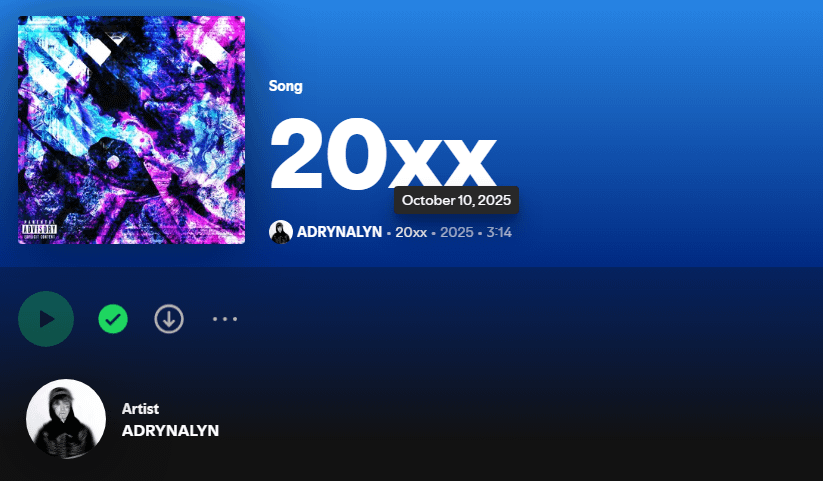
ive tried every different spotify downloader i could find, different platforms, internet archive, etc.. and it seems like this song has just been wiped everywhere
pretty much the only evidence i have it still exists is the fact its in a couple of my spotify playlists and its listed here as well
all the spotify downloaders ive tried download the correct metadata but the actual song is a different song of the same name
r/musichoarder • u/orbitolinid • 5d ago
Basically, I don't listen to music an awful lot. Mostly in the car on longer rides. Been using iBroadcast since youtube music shut down and I wonder whether there are alternatives. I have about 85GB of music files. I don't have internet at home but use my phone as wifi modem when I'm in. Thus any server solution won't work. So while I understand that they need to make money, and my collection is not small it stings to pay $5 per month to just store this stuff, and listen to something every now and then. At home everything's stored on an external HD. My computer is an ultrabook on which I'd rather not store all the files. Plus I'd not be able to play music in the car. Store everything on my iphone? I'm conflicted as I don't have unlimited storage space either and would need something to send the music to my car or my laptop. I don't use headphones.
Most of the music is not available on streaming services as it's quite unique. Much of it ripped from cd/record. I'd not use streaming services anyway but rather buy music from the bands I listen to as they're too small to make money off those.
Suggestions?
