r/RatatuiRust • • 3h ago

Discussion Lessons learned building a terminal multiplexer with Ratatui!!

2 Upvotes

After spending some time building a custom terminal multiplexer in Rust, I wanted to share a quick breakdown of the architectural bottlenecks I ran into and how Ratatui fit into the picture.

If you're thinking about building a TUI that hosts other terminal programs (or just complex multi-pane layouts), these were the biggest takeaways:

1. Decoupling PTY Parsing from the Render Loop

Early on, it's tempting to read from a PTY and immediately trigger a frame draw. That breaks down fast when a child process dumps massive output (like cat on a huge file or a noisy build log).

  • The fix: Separate the byte-stream parser (like vt100 or alacritty_terminal) from Ratatui's render loop. Let background threads ingest PTY stdout into an in-memory terminal grid, and only notify the UI thread that a pane is "dirty." Ratatui then just reads the current grid state on its own tick/event cadence without blocking the child process.

2. Recursive Layout Trees for Dynamic Splits

Ratatui’s Layout solver works cleanly when you model your workspace as a binary tree:

  • Branch nodes hold a split direction (Horizontal/Vertical) and a percentage/ratio.
  • Leaf nodes hold the active PTY state and scrollback buffer.

Walking the tree recursively during draw() to compute Rect bounds means resizing, closing, or swapping panes doesn't require manual coordinate math—you just mutate the tree and let Ratatui recalculate the geometry on the next frame.

3. Terminal State & Panic Hygiene

When you are intercepting raw keystrokes (especially prefix keys or Ctrl+C) and running in the alternate screen, a single unhandled panic will leave the host terminal completely mangled. Setting up a custom std::panic::set_hook that explicitly disables raw mode and leaves the alternate screen before printing the backtrace is mandatory for staying sane while debugging.

4. Handling Resize Propagation (SIGWINCH / TIOCSWINSZ)

A subtle edge case with multiplexers is double-resizing:

  1. The host terminal resizes -> Ratatui recalculates pane Rects.
  2. You have to diff the new Rect dimensions (minus borders/padding) against each pane's previous dimensions, and only send a resize ioctl to the underlying PTY if the actual character grid size changed. Sending redundant resize signals causes flickering in nested TUIs like Vim or htop.

For anyone else building heavy layout-driven apps or PTY wrappers in Ratatui—how are you handling ANSI escape sequence parsing or custom keybind routing?


r/RatatuiRust • • 1d ago

Showcase venti - a terminal multiplexer built with ratatui

16 Upvotes

hey! i've been working on venti, a linux terminal multiplexer written in rust with ratatui.

the goal is to build a keyboard-driven terminal workspace that makes managing multiple sessions, panes and workspaces feel natural, without adding unnecessary complexity.

what it currently supports

  • persistent sessions using unix domain sockets
  • dwindle tiling and monocle layouts
  • floating panes with mouse-based movement and resizing
  • multiple workspaces
  • four keybinding profiles: beginner, hypr, vim and dev
  • vim-like copy mode and scrollback search
  • a command palette and live settings editor
  • 15 built-in themes
  • mouse support and interface animations
  • configurable keybindings and application settings

a little about the implementation

venti uses ratatui for its interface, crossterm for terminal interaction, portable-pty for managing terminal sessions, and unix domain sockets for communication between clients and the persistent session server.

one area i've been exploring is terminal graphics support. venti has experimental support for kitty, sixel and iterm2 graphics protocols. this part is still a work in progress, particularly when panes are resized, moved or rearranged. i'd rather be clear about that than present it as finished.

the project is linux-only at the moment, and is still actively developing. there's plenty left to improve.

i'd genuinely appreciate feedback, especially from people familiar with ratatui, terminal emulators or terminal multiplexer internals. i'm interested in hearing what feels right, what feels awkward, and what could be designed better.

demo: https://youtu.be/GsD61wQLam0

source: https://github.com/programmersd21/venti

thanks for taking a look!


r/RatatuiRust • • 2d ago

Showcase Advent of Code TUI

Thumbnail
gallery
8 Upvotes

Hey so having tried Advent of Code last year, I though I would make a TUI for it. It saves your submissions via a Session cookie.

As for programming language, you can add any language you want in the config file or change it in the UI itself

It allows you to view, solve and submit advent of code problems. It also allows you to view previous year's problems.

https://github.com/craftty-org/aoc-tui


r/RatatuiRust • • 2d ago

Tutorial Getting started with TachyonFX: Adding animations to Ratatui applications

9 Upvotes

Ratatui is great for building terminal interfaces, but sometimes a static interface isn't enough. Transitions, fades and other small animations can make a TUI feel much more responsive.

That's where TachyonFX comes in.

TachyonFX is an effects and animation library built for Ratatui. It provides a collection of effects that can be composed, sequenced and applied directly to Ratatui's rendering buffer.

In this tutorial, we'll build a small application and learn how to integrate TachyonFX into a Ratatui render loop.

1. Setting up the project

Create a new Rust project:

cargo new ratatui-effects
cd ratatui-effects

Add the dependencies:

cargo add ratatui@0.30.2
cargo add tachyonfx@0.25.2

2. Understanding how TachyonFX works

Before writing code, there are three important things to understand:

  • Effects are stateful. Create an effect once and keep it around while it runs.
  • Effects transform rendered content. Render your widgets first, then process effects.
  • Effects need time information. Each frame, pass the elapsed time since the previous frame.

The general rendering flow looks like this:

  1. Calculate the elapsed time.
  2. Render your Ratatui widgets.
  3. Process the active TachyonFX effects.
  4. Draw the next frame.

3. Your first animation

Replace src/main.rs with:

use std::{
    io,
    time::Instant,
};

use ratatui::{
    crossterm::event::{self, Event, KeyCode},
    prelude::*,
    widgets::Paragraph,
};

use tachyonfx::{
    fx,
    EffectManager,
    Interpolation,
};

fn main() -> io::Result<()> {
    let mut terminal = ratatui::init();

    let mut effects: EffectManager<()> = EffectManager::default();

    let effect = fx::fade_to(
        Color::Cyan,
        Color::Gray,
        (1_000, Interpolation::SineIn),
    );

    effects.add_effect(effect);

    let mut last_frame = Instant::now();

    loop {
        let elapsed = last_frame.elapsed();
        last_frame = Instant::now();

        terminal.draw(|frame| {
            let area = frame.area();

            let paragraph = Paragraph::new(
                "Hello, TachyonFX!"
            )
            .alignment(Alignment::Center);

            frame.render_widget(paragraph, area);

            effects.process_effects(
                elapsed.into(),
                frame.buffer_mut(),
                area,
            );
        })?;

        if event::poll(std::time::Duration::from_millis(16))? {
            if let Event::Key(key) = event::read()? {
                if key.code == KeyCode::Char('q') {
                    break;
                }
            }
        }
    }

    ratatui::restore();

    Ok(())
}

Run it:

cargo run

You should see the text rendered in your terminal with a color transition.

Press q to exit.

4. Combining multiple effects

One of the most useful features of TachyonFX is effect composition.

You don't have to implement every animation manually. You can combine existing effects.

There are two particularly useful composition functions.

Parallel

Runs multiple effects at the same time.

let effect = fx::parallel(&[
    fx::fade_from_fg(Color::Red, 500),
    fx::coalesce(800),
]);

Sequence

Runs effects one after another.

let effect = fx::sequence(&[
    fx::fade_from_fg(Color::Black, 300),
    fx::coalesce(500),
]);

These are useful when building transitions between different screens or revealing content gradually.

5. Exploring other effects

TachyonFX includes considerably more than simple fades.

Some interesting effects to explore:

EffectPurpose
dissolveGradually dissolves content
coalesceGradually materializes content
slide_inSlides content into view
sweep_inReveals content using a sweep
evolveTransforms characters over time
explodeCreates a particle-like dispersion
hsl_shiftAnimates colors through HSL
glitchApplies glitch-style visual effects

It also supports spatial patterns such as radial, diagonal, checkerboard and spiral patterns.

You can explore interactive effect examples through TachyonFX FTL.

6. A few things to keep in mind

When integrating TachyonFX into a real application:

  • Don't recreate effects inside your render loop.
  • Keep track of elapsed time between frames.
  • Apply effects after rendering the widgets they should affect.
  • Use effect composition instead of manually implementing complex transitions.
  • Avoid unnecessary animations that make terminal interfaces harder to read.

7. Useful resources

That's the basic idea behind using TachyonFX with Ratatui.

There's a lot more to explore, especially effect composition, custom effects, cell filtering and spatial patterns.

If you've used TachyonFX in your own Ratatui projects, I'd be interested to hear how you've integrated it and what effects you've found useful.


r/RatatuiRust • • 3d ago

Showcase Ratclone a keyboard-driven terminal UI for rclone

Post image
19 Upvotes

A keyboard-driven terminal UI for rclone, with Vim keys. Browse your accounts and the local disk, copy and move between them, rename and delete, and keep transfers running in the background — even after you quit.

https://github.com/SyscallBrain/ratclone


r/RatatuiRust • • 3d ago

tmail: a terminal email client with a workspace instead of a plain inbox.

Post image
10 Upvotes

I've been using aerc for a while, but I honestly hated its ugly UI, so I decided to build Tmail, a faster, cleaner, and more modern terminal email client.

Built with Rust/Ratatui on top of Rataflow, it visualizes email threads as node-based graphs, with messages as cards and replies as edges. It also supports IMAP/SMTP, Maildir, PGP/S-MIME, Lua scripting, and more.

My favorite features are rendering HTML emails directly in the terminal, Markdown-to-HTML conversion, and the node-based reply system.

I didn't originally plan to vibe-code it and i designed the ui without ai help, but I ended up using Opus 5.5 to get something usable as quickly as possible. (cuz i made this for myself lol)

https://github.com/tuna4ll/tmail


r/RatatuiRust • • 3d ago

News surprise, surprise...! 🥁😸🤭

Post image
6 Upvotes

0, 100, 200, 300, 400, 500, 600, 700, 800, 900 ❌

1,000 WEEKLY VISITORS ✅✅✅

ratatuists, let's celebrate this, shall we? 😻✨🎊

drop a 🥳 in the comments below to show your support!!!

let's keep:

  • 🌱 growing
  • 🛠️ building
  • 🤝 sharing
  • 🧭 exploring
  • 🧠 learning

...and most importantly, being the #1 TUI community on Reddit! 💗

stay safe everyone, peace ✌️🕊️

*~ yours lovingly...*
s.d.


r/RatatuiRust • • 4d ago

Showcase when your terminal feels like hyprland in 2026...

15 Upvotes

r/RatatuiRust • • 5d ago

Showcase Live performance for Android apps in your terminal!

Post image
50 Upvotes

r/RatatuiRust • • 5d ago

Showcase flexing kitty support in venti hehe

Post image
7 Upvotes

r/RatatuiRust • • 5d ago

Discussion Maybe the tui deserves more credit.

Thumbnail
gallery
15 Upvotes

Someone put a spell on me this week. I finally got home for a few days and had some time to code, then the machine I was working on died. Spent a day recovering data. Now I'm back on my old 2015 MacBook Air running Omarchy. Still does the job. 😅

I'm working on sdrtop using Rust and Ratatui, and have come to really appreciate what a powerful tool a terminal can be.

We often associate terminals with running commands, building and compiling code or administering a system, but they offer so much more.

Using Ratatui we can build fully featured applications with dynamic data, graphics, tables, views and fully keyboard driven controls all in a terminal.

It really does fit well with my project sdrtop. Radio is all about watching things that are constantly changing, so having a clean interface that shows my metrics, signal activity and useful information is great.

I also love how the same app can be used on an old laptop, via SSH and tmux or on my little cyberdeck.

There's no need for a bulky desktop environment.

Whilst the retro feel is a nice touch, Ratatui has really made me appreciate how powerful a terminal can be as an application platform.

There is still a lot to cook! 👨🏽‍🍳🐁


r/RatatuiRust • • 6d ago

Question guys is this the peak terminal age?

Post image
9 Upvotes

# venti


r/RatatuiRust • • 6d ago

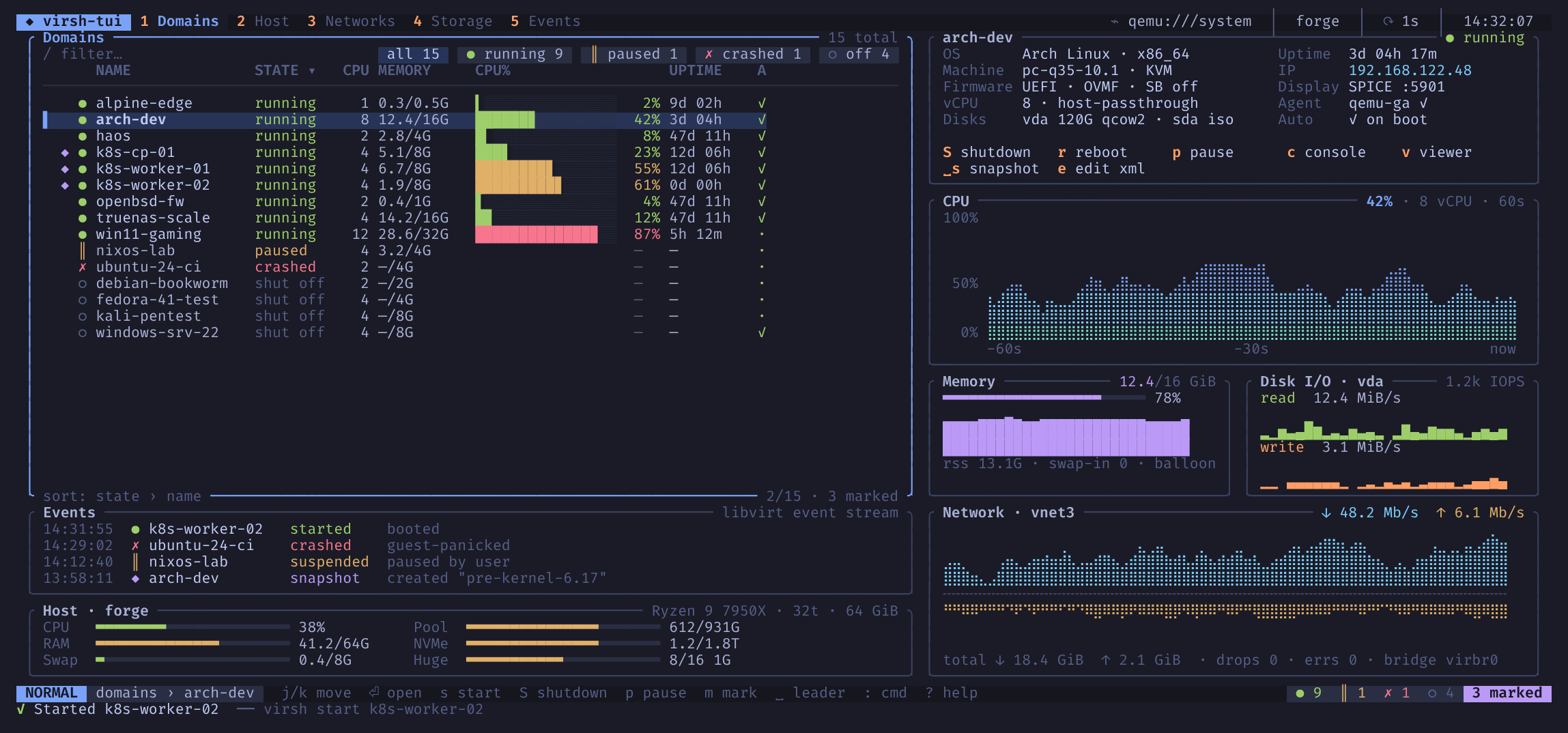
Showcase virsh-tui – a keyboard-driven TUI for libvirt/KVM, with vim keys and live graphs

9 Upvotes

https://syscallbrain.github.io/virsh-tui/images/dashboard.png

I manage my VMs with virsh and kept bouncing between virsh list --all, virsh domstats and virt-manager, so I wrote a terminal UI for it in Rust with ratatui.

Every action is a plain virsh (or virt-install) command. virsh-tui shows you the command before it runs and again after, so you know what it did and can paste it into a script later. It has the same permissions virsh has and works with qemu:///system, qemu:///session and remote hosts over qemu+ssh://.

What it does right now:

  • Domain list with filtering, sorting, marks and bulk actions
  • Start, ACPI shutdown (it waits until the guest is really off), destroy, reboot, pause, managed save, autostart
  • Per-domain monitor with vCPU, memory/balloon, disk and NIC rates, and 60 s / 5 min / 1 h history
  • A hardware editor that shows you the XML diff and the exact commands before you apply with :w
  • Snapshot tree, a host view (hugepages, KSM, pools), networks with DHCP leases, storage pools and volumes with backing chains
  • A new-domain wizard that builds the virt-install command for you
  • A : command line with Tab completion for virsh flags; anything it doesn't know goes straight to virsh
  • --dry-run prints what each key would run, and --demo lets you try it with no libvirt at all (the screenshot is from demo mode)

Linux only. Install with cargo install --locked --git https://github.com/SyscallBrain/virsh-tui (needs Rust 1.88+).

GitHub: https://github.com/SyscallBrain/virsh-tui Docs: https://syscallbrain.github.io/virsh-tui/

It's still 0.1, so bug reports and "it can't do X" comments are very welcome.


r/RatatuiRust • • 7d ago

Showcase rate my new workspaces bar for venti

Post image
5 Upvotes

r/RatatuiRust • • 7d ago

Showcase ytmtui - a lightning-fast yt music tui (rust + mpv) [early post]

Thumbnail gallery
9 Upvotes

r/RatatuiRust • • 7d ago Bravo

Showcase lazybw – a keyboard-first TUI for your Bitwarden vault

7 Upvotes

https://syscallbrain.github.io/lazybw/images/demo.gif

I use Bitwarden every day and kept switching to the browser just to copy a password or check a 2FA code, so I wrote a TUI for it. lazybw lets you browse, search, copy and edit your vault without leaving the terminal, with Vim-style keys. It's built with Ratatui and runs the official Bitwarden CLI (bw serve) underneath, so it never touches the vault crypto itself.

Some of what it does:

  • Fuzzy search with qualifiers (folder:work, is:weak …) and a Ctrl-p finder
  • yu / yp / yt to copy username, password or the 2FA code; the clipboard clears itself
  • A form editor with Vim modes and a password generator, or $EDITOR for notes and raw JSON
  • Vault health: exposed, reused, weak and old passwords
  • Undo/redo for vault changes, visual mode for bulk moves
  • Every key can be rebound, 10 built-in themes, Nerd Font / Unicode / ASCII icons
  • Works over SSH (OSC 52 clipboard), on X11 and Wayland

Linux only for now (x86_64 and aarch64; it also runs on Termux). There are .deb, .rpm, AUR packages (lazybw-bin, lazybw), static binaries and a Docker image with bw included.

GitHub: https://github.com/SyscallBrain/lazybw Docs: https://syscallbrain.github.io/lazybw/

It's at 1.2, so I'd really like to hear what breaks or what's missing. (Built with AI assistance.)


r/RatatuiRust • • 8d ago

Showcase 🦀 datarig | A Terminal-based Database Workspace

Thumbnail
gallery
58 Upvotes

Hi everyone! I’m a backend engineer based in South Korea, and I’ve been working on an open-source database workspace called datarig, built in Rust.

I’ve always liked tools such as DataGrip, but found them rather heavy and sluggish at times. I started building datarig for my own day-to-day work, aiming for speed and efficiency without compromising on features or usability.

✨ Key Features
- PostgreSQL / MySQL support, SSH tunnelling and TLS
- Full keyboard and mouse support, including scrolling, clicking and dragging
- Vim-style SQL editor, autocompletion and schema explorer
- Efficient handling of large datasets with pagination and disk spilling
- EXPLAIN ANALYZE with multiple execution plan visualisations
- Real-time database performance monitoring
- SQL risk analysis and transaction safety
- Data editing and CSV / Excel / Parquet export
- CI-enforced performance budgets and regression testing

datarig is still pre-1.0, but I’m actively developing and improving it. I also plan to support more database engines, including SQLite, Redis and others.

More importantly, my long-term vision is to build a database workspace where developers and AI agents can work together, rather than just another database client.

I’d love to see datarig grow into a fast, reliable and capable open-source tool with the help of the community.

Any feedback, suggestions or contributions would be very much appreciated!

🔗 https://github.com/DokaDev/datarig


r/RatatuiRust • • 8d ago

Meme Well, it's how it is...

Post image
28 Upvotes

r/RatatuiRust • • 8d ago

Showcase day 3 of developing venti!

Post image
7 Upvotes

added sidebar today

also strengthened the kitty graphics protocol

sixel needs to be better

also hardening tui stuff

making everything more eye candy

also fixed bunch of bugs

its very close to a release

i would love feedback

bye


r/RatatuiRust • • 9d ago

Showcase I built Rustel: a native Strudel engine in Rust with a terminal studio using Ratatui and full CLI

4 Upvotes

r/RatatuiRust • • 9d ago

Showcase latest preview on venti, my custom terminal multiplexer :)

Post image
8 Upvotes

lmk if u guys have any feedback or suggestion im open to all of them !


r/RatatuiRust • • 10d ago

Discussion guys just lmk what u think I'm working on :D

Post image
16 Upvotes

r/RatatuiRust • • 10d ago

Showcase update: here is how it looks now

Post image
6 Upvotes

r/RatatuiRust • • 10d ago

Showcase edamame: a terminal Markdown editor

Post image
13 Upvotes

r/RatatuiRust • • 10d ago

Showcase I built a keyboard-first GitHub Actions TUI in Rust 🦀🔬

Post image
4 Upvotes

Hey everyone!

I've been working on a small Rust project called Runline.

It's a terminal UI for monitoring and investigating GitHub Actions runs. The idea is simple: when a CI run fails, I wanted a quicker way to find what went wrong without constantly switching between the terminal and GitHub's web interface.

Some things it supports:

  • Failure-first dashboard for GitHub Actions runs.
  • Navigate jobs and steps, with failed steps automatically selected.
  • Search logs and jump directly between errors.
  • View annotations, warnings and errors with file and line information.
  • Rerun failed jobs and cancel stuck runs.
  • Switch between run attempts.
  • Themes, log saving and an offline demo mode.

It's written in Rust and uses the GitHub CLI (gh) for authentication and API access.

You can install it with:

cargo install runline

GitHub: https://github.com/programmersd21/runline

It's still a relatively new project, and I'd genuinely appreciate feedback from people who work with Rust, terminal applications, or CI/CD.

I'm particularly interested in thoughts on the TUI design, architecture and anything that could be improved.

Thanks for checking it out!