r/sdforall • u/digitalhunters0 • 4h ago
Resource PAN 2 now runs in Forge Neo, with a timeline editor that writes its JSON prompts for you

1
Upvotes
r/sdforall • u/digitalhunters0 • 4h ago
r/sdforall • u/pixaromadesign • 1d ago

In this episode, we test two new image models in ComfyUI with 14 free workflows: MiniMax H3 Image, the image model that MiniMax made itself, and FIBO 2, made by Bria AI. Each model gets seven workflows, so you can generate images from text, edit an image with a prompt, combine a few images, and change only a small area. We test them all, and see what each model does well, and where it struggles.
MiniMax H3 Image: text to image up to 4K, a short idea turned into a full prompt with MiniMax's prompt expander, edit a picture by text, combine two pictures, combine different elements in one image, and change only an area with a box or a mask, so the rest of your image stays as it is.
FIBO 2: it was trained on long, structured JSON prompts, so in these workflows a small helper model writes the JSON from your short idea, and you can always read it. Text to image with the fast Turbo model or the full Dev model, change one thing in an image, edit a picture by text, combine pictures, and edit inside a box or with a mask.
At the end, I compare both with models from older episodes, with the same prompts: Krea 2, MOSS and the P-H3 LoRA for text to image, and the P-H3 LoRA, FLUX 3 Klein and Qwen Image 2.1 for editing. The exact prompts are on the episode page, next to the workflows.
r/sdforall • u/cgpixel23 • 1d ago

Hello everyone
I’ve just released a new fully automated Viggle character motion transfer workflow that works with 6GB of vram. This workflow allows you to take any character reference image and transfer the motion from a video onto that character with impressive precision,it is optimized for low-VRAM users thanks to the INT8 ConvRot version of the Viggle model. you can also use LoRA version that converts MiniMax H3 Ref2V into Viggle mode for the motion-transfer process.
The entire workflow is highly automated:
➡️ Load your character reference image
➡️ Upload your motion video
➡️ Choose the video duration
➡️ Let the integrated Qwen VL prompt system analyze the video and handle the prompting
➡️ Generate the result
I also included RelayVSR for upscaling, since Viggle can generate at 480p or 720p. On my setup, a 5-second 480p video takes around 20 minutes.
Worklow Link
https://drive.google.com/file/d/1_FoFWRreYRLTG3d9o2MEUiZ2ZOG5Nk2_/view?usp=sharing
https://civitai.com/articles/39038/viggle-in-comfyui-character-motion-transfer-made-easy-6gb-vram
r/sdforall • u/Extreme_Aardvark8977 • 2d ago
Hey everyone!
I'd like to share SeedVR2 Studio, an open-source project I've been working on to make AI image and video upscaling easier and more accessible.
It brings SeedVR2 into a modern, user-friendly web interface, without the need for complicated workflows.
Key features:
GitHub: https://github.com/Aaronstanley78/SEEDVR2-Studio-Complete
I'd love to hear your feedback and suggestions for future improvements.
If you find it useful, consider giving the repository a star to support the project!
Thanks for checking it out!
r/sdforall • u/Puzzleheaded_Note739 • 2d ago

r/sdforall • u/Ok_Contribution8157 • 3d ago

r/sdforall • u/Successful_Record_58 • 3d ago
r/sdforall • u/pixaromadesign • 6d ago

In this video of ComfyUI Nodes Explained, you will learn what every setting on the KSampler does: the seed and control after generate, how many steps you really need, what CFG does and why it can burn your image, how the sampler and the scheduler work together, and why denoise stays at 1 with an empty latent. Four "A Deeper Look" chapters show the starting noise a seed makes, how much noise each step removes, how CFG mixes two guesses, and how the samplers differ. Everything is shown with Z-Image Turbo, and the full Z-Image model for CFG.
r/sdforall • u/No-Sleep-4069 • 6d ago

r/sdforall • u/Deftroyy • 6d ago
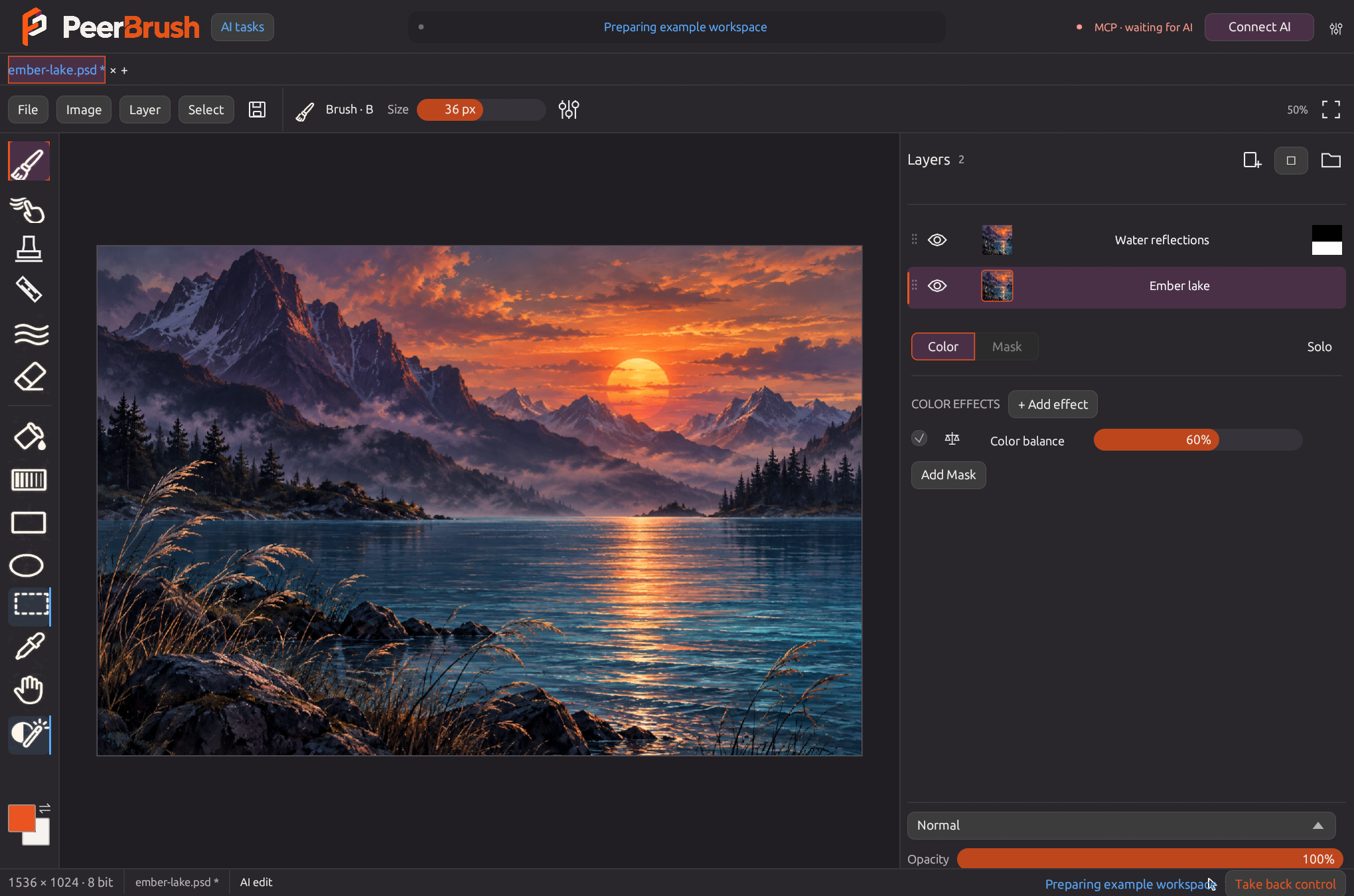
If you have two local Stable Diffusion inpaint results and each one got a different part right, keep them as separate layers. That lets you bring back a detail from the original or blend a seam without running the model again.
I’m the solo developer of PeerBrush. It’s free and open source, and this workflow uses the desktop editor without connecting an AI client. It works with rendered PNGs from a local Stable Diffusion workflow. The screenshot shows the editor on its own AI-generated sample artwork. AI helped draft this guide.
Official workspace demo: https://peerbrush.com/#demo
Free downloads: https://peerbrush.com/downloads.html
Official workspace screenshot: https://raw.githubusercontent.com/Deftr0y/PeerBrush/v0.30.1/docs/images/workspace.png
r/sdforall • u/AfterInvestigator631 • 7d ago
r/sdforall • u/pixaromadesign • 8d ago

In this episode, we test P-H3 Image in ComfyUI with 18 free workflows. P-H3 Image is a new image model from Pruna AI, built on MiniMax H3: it generates images up to 4K and edits your photos with one sentence. We test them all, and see what it does well and where it struggles.
Generate images: text to image up to 8 megapixels, a short idea turned into a full prompt with the Prompt Upsampler, and exact words written into the image.
Edit one image: a new place, day to night, new words on a sign, restyle a photo into a 3D cartoon, restore and colorize an old photo, and a character sheet with four sides.
Two or more images: an outfit from a second picture, a character in a scene, a logo printed on a product, and four people in one group photo.
Box, frame, upscale and style: edit only inside a box, outpaint to a wider image, a creative upscale from small to big, and a style from a second picture.
Plus a bonus: picture to video with MiniMax H3, with sound and music. And bonus 2: run P-H3 Image in the cloud on RunningHub, with no GPU and nothing to install.
r/sdforall • u/Stable2go • 7d ago

I put together a site that browses prompts like a feed, with one-click copy, and I'm trying to figure out if it's actually useful or just something I like because I built it.
It's browser-only, nothing to install. Prompts are pulled from sources that allow it, like the Civitai API, with attribution links back.
If you try it, grab anything off the home feed, paste it into your usual UI, and tell me whether the copy button got the whole prompt. If it crashes, I need your device type.
r/sdforall • u/cgpixel23 • 8d ago

Hello everyone i've been testing a new video upscaling method in ComfyUI called RelayVSR, and the results are really impressive!
Unlike conventional upscaling methods that can sometimes modify the original video, introduce unwanted details, or change the appearance of characters and scenes, RelayVSR uses a different approach. A large generative model creates high-quality reference latents for selected keyframes, while a lightweight Dual-Memory Video Transformer uses these references to reconstruct the remaining frames while preserving the original video structure and details.
For this workflow, I've combined RelayVSR with my optimized MiniMax H3 workflow, Pika H3 6-step LoRA, attention optimization nodes, and NVIDIA DLSS5 to generate and upscale videos efficiently, even on lower-VRAM GPUs.
Generation and Upscaling Time:
Project Page Link
https://kopperx.github.io/RelayVSR/
Models Link
https://huggingface.co/Comfy-Org/RelayVSR
Workflow Links
https://drive.google.com/file/d/1KLL5tKOeCCPfn64OEoH-PPc3-0v6ksED/view?usp=sharing
r/sdforall • u/cgpixel23 • 9d ago

Hello Everyone i tested New P-H3-Image ComfyUI workflow! This powerful model combines high-resolution image generation up to 8 megapixels with image editing up to 4 megapixels. I'm using the INT8 ConvRot version, optimized and tested on my RTX 3060 6GB VRAM + 16GB RAM and here are my verdict about the model.
Model Advantages & Strong Points:
Image Generation Times (RTX 3060 6GB VRAM + 16GB RAM):
Image Editing Times:
Current Limitations:
Although the model is excellent at realistic image generation, artistic style generation is not as strong as Krea 2. For image editing, face swaps, head swaps, and clothing swaps produced very poor results in my tests. Overall, P-H3-Image is a very interesting model, especially if you are looking for realistic image generation, detailed portraits, and versatile image editing in a single workflow.
Workflow Links With Prompts
https://drive.google.com/file/d/1qZzHnjLmpp8oTUCCtoXBgEu8X652X5vl/view?usp=sharing
r/sdforall • u/Stable2go • 10d ago
r/sdforall • u/pixaromadesign • 13d ago

In this video of ComfyUI Nodes Explained, you will learn how ComfyUI sets the size of your image: what the empty latent is, how width and height work, why the same seed gives a new image at a new size, why a bigger image is not always better, why 1080 becomes 1088, how aspect ratio works, what batch size does, which empty latent node to use, and an easier way with Resolution Pixaroma. Two "A Deeper Look" chapters show what a latent really is and where the steps of 16 come from. Everything is shown with Z-Image Turbo.
📥 PRACTICE + FINISHED WORKFLOWS for this video (free, no account):
https://workflows.pixaroma.com/comfyui-nodes-explained/3/
Drag the Practice workflow into ComfyUI and do the tasks in the notes. The Finished workflow shows every answer, and the Pixaroma version sets the size with Resolution Pixaroma.
r/sdforall • u/Rare-Win2117 • 13d ago

r/sdforall • u/pixaromadesign • 15d ago

In this episode, we test MiniMax H3 in ComfyUI with 25 free workflows, plus 2 bonus workflows. H3 is a video model that makes video with sound, from your images, videos and audio. We test them all, and see what H3 does well and where it struggles.
Part 1, change your video: a character sheet from one picture, then swap the person in your video (a character, only the head, or a cartoon and mascot), motion transfer, edit a video by text, change the outfit from pictures, restyle a video, sharpen it to Full HD, and join your clips into one video with their sound.
Part 2, bring a picture to life: tell it what to do, make a picture talk from typed words, make it talk or sing with your own voice or song (Audio Sync), and an outfit change spin with Flux Klein and H3.
Part 3, long videos with H3 Timeline: sing a song in scenes, clean cuts, four singers in one song, a character who walks in, act a story, walk into a new place, redo one scene and keep the good ones, and a bigger size.
Part 4, remake your video in 2K, plus two bonus workflows: text to video in 2K, and first and last frame to video.
We also look honestly at where H3 struggles: a person who joins a scene can come in twice, one seed can change the whole look of a scene, and Talk keeps the pose of your picture.
r/sdforall • u/cgpixel23 • 15d ago

Hello everyone today I am showing you a new ComfyUI workflow that combines MiniMax H3 Singularity V2 combined with the Pika H3 LoRA to generate videos at approximately 0.6 MP with only 6 steps. Then, using the Ultimate MiniMax H3 Upscale node and Kijai's Regenerative 2K LoRA at a lower weight, the video is progressively enhanced with additional LoRAs to improve details, textures, and overall quality.
My test results:
The interesting part is that instead of generating directly at high resolution, we generate at a much lower resolution and let the regenerative upscaling process recover and enhance the details.
I've included all the required LoRA and custom node links with the workflow. Let me know what you think, especially if you've tested this new regenerative upscaling approach!
Workflow Link
https://drive.google.com/file/d/1siWKOJlpJ3SUi3EEf0fRpGMMpZLbNstR/view?usp=sharing
r/sdforall • u/vchauhan_ • 16d ago

r/sdforall • u/skk80 • 17d ago
r/sdforall • u/cgpixel23 • 17d ago

Hello everyone I've been working on a new optimized ComfyUI workflow for MiniMax H3 Singularity V2, the latest community fine-tuned version focused on action scenes and complex movements. This version brings noticeable improvements in some fast actions, motion handling, distant faces, close-up portraits, visual styles, prompt adherence, and audio reference handling compared to the previous version. However, the model is around 32GB in size, making it quite demanding to run. To address this, I've built a custom Low VRAM workflow using INT8 quantized models, Turbo LoRA, and additional optimization ATTENTIONS nodes to reduce resource requirements and improve generation performance. I tested it with different prompts featuring fast movements, action sequences, distant characters, and close-up faces to see how well it handles these challenging scenarios. I'm sharing the workflow and testing results in my latest tutorial. Let me know what you think about the results!
Workflow Links
https://drive.google.com/file/d/1m4JcGyCiiZo78GoKoMIhedN7M6KnqI_B/view?usp=sharing